Coming soon
DeliveryAssign deliveries to a rider and track payment on delivery.Learn more →Add-on · Team
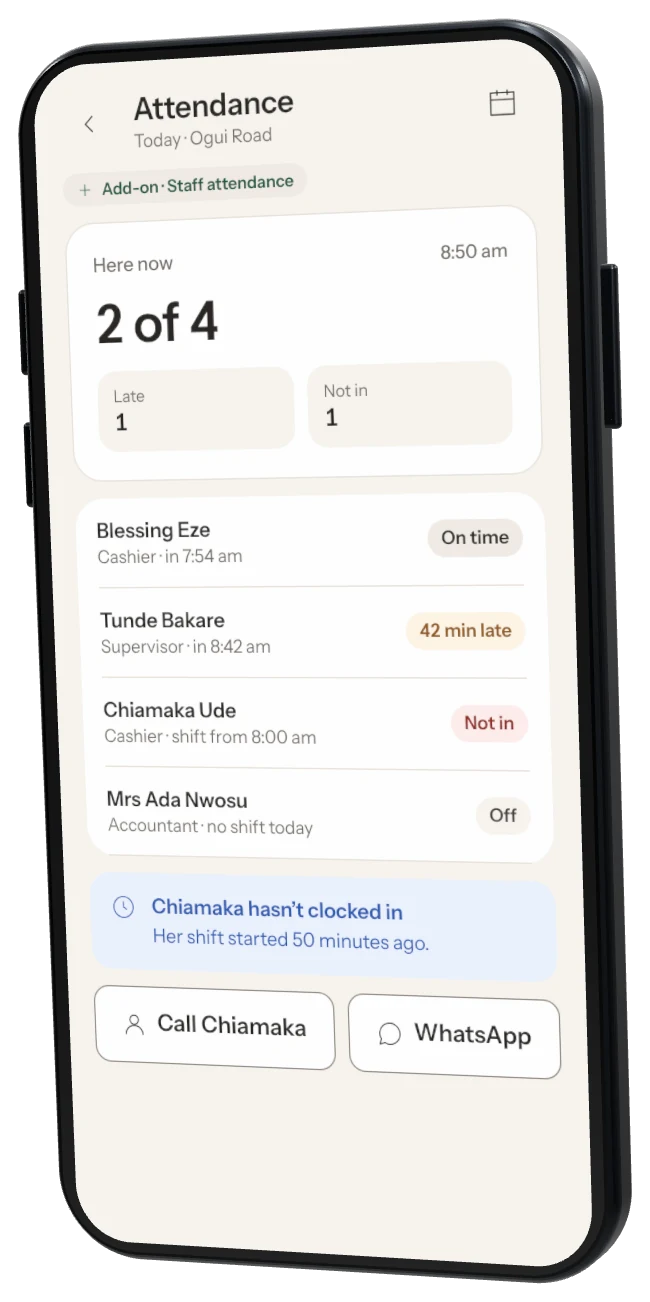
Who came in, and when.
Staff clock in and out with their PIN on the till or phone. See hours worked, late days and breaks — and get ready-made totals for pay day.
PriceComing soon
Clock inWith staff PIN
ShiftsPlan the week
Pay dayHours in Excel
How it works
Simple from day one.
1
Set shifts
Plan who works when, for the week.2
Clock in with PIN
On the till or the phone, only while in the shop.3
Check hours
See hours, late days and overtime for pay day.Shifts
Plan the week in minutes.
Drag staff into shifts, share the rota on WhatsApp and see who’s covering when someone is off.
- Weekly rota on WhatsApp
- Swap requests between staff
- Sales by shift
This weekRota · 26 Oct – 1 Nov
Mon – Fri morningBlessing · Counter 17 am – 3 pm
Mon – Fri eveningTunde · Counter 12 pm – 9 pm
SaturdayBlessing, Tunde7 am – 9 pm
Share rota on WhatsAppQuestions
Staff attendance FAQ
When is it coming?
Staff attendance is coming soon. Tap “Get notified”.
Can staff clock in from home?
You can limit clock-in to the shop’s tills, or to phones on the shop’s Wi-Fi.
Does it pay salaries?
No. It gives you hours and totals to pay staff your usual way.
Can I fix a wrong clock-in?
Yes. Owners and managers can edit, and every change is recorded.
Do staff need a separate PIN?
No. They use the same PIN they sell with.
More add-ons
Works well with
Add-on · ₦8,000/month per shop
More shopsRun several branches, move stock between them, compare sales.Learn more →Add-on · ₦3,500/month
Accounting exportSend sales and expenses to QuickBooks, Zoho Books or Sage.Learn more →Coming soon
Tax & VATVAT on receipts and tax-ready reports for your accountant.Learn more →Stop guessing.
Start growing.
Download Storeflow free and make your first sale today. Free for up to 100 products — no card needed.